Featured image of post 【Git】問題解決:remote: Support for password authentication was removed on August 13, 2021. Please use a personal access token instead. remote: Please see https://github.blog/20XX-XX-XX-token-authentication-requirements-for-git-operations/ for more information.

【Git】問題解決:remote: Support for password authentication was removed on August 13, 2021. Please use a personal access token instead. remote: Please see https://github.blog/20XX-XX-XX-token-authentication-requirements-for-git-operations/ for more information.

紀錄解決 GitHub 不支援密碼認證的問題 — GitHub token 替代、git remote set-url 方式設定認證 token。

問題描述

當我們想要使用 git 時,出現以下類似訊息 (日期可能不同) 的解決方法。

remote: Support for password authentication was removed on August 13, 2021. Please use a personal access token instead.
remote: Please see https://github.blog/2020-12-15-token-authentication-requirements-for-git-operations/ for more information.

問題成因

原因是 github 從 August 13, 2021 之後,
對於 git 相關的存取已不再支援 password,須改用token方式進行。

可參考 github 的 blog

2021/8/27 更新:新的解法

舊的解法並不能一次就治好,必須還要每次都重新產生 token,
這次為了安全性問題,反而造成了一些額外的麻煩啊…

因此現在找到了一個新的方法,可以直接避免後續需要重新產生 token 的問題。

我們前面的步驟一樣要像舊的解法去產生 token,
差別在最後一步,我們不把 token 當作密碼輸入,
我們新增一個 remote,包含著我們的 token,

雖然快速,但快的代價相對的就是容易有資安問題,請自行注意。

新增 git remote

git remote set-url origin https://<githubtoken>@github.com/<username>/<repositoryname>.git

範例:

git remote set-url origin https://ghp_XXXXXXXXXXXXXXXXXXX@github.com/howarder3/test_repo.git

解法引用自:

舊的解法

這個算是 git 為了安全性所新增的功能,
讓我們的 git 過一段時間之後憑證就會自動過期
(也就是說,隔一段時間就會沒辦法直接與遠端同步)

我們可以去 github 的頁面進行相關設定

step 1. 去個人頁面的 Settings

【Git】問題解決:remote: Support for password authentication was removed on August 13, 2021. Please use a personal access token instead. remote: Please see https://github.blog/20XX-XX-XX-token-authentication-requirements-for-git-operations/ for more information.

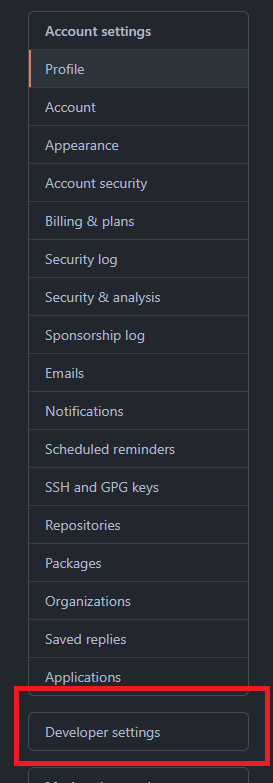
step 2. 找到左側的 Developer settings

【Git】問題解決:remote: Support for password authentication was removed on August 13, 2021. Please use a personal access token instead. remote: Please see https://github.blog/20XX-XX-XX-token-authentication-requirements-for-git-operations/ for more information.

step 3. 點選 Personal access tokens

【Git】問題解決:remote: Support for password authentication was removed on August 13, 2021. Please use a personal access token instead. remote: Please see https://github.blog/20XX-XX-XX-token-authentication-requirements-for-git-operations/ for more information.

step 4. 選擇 Generate new token

【Git】問題解決:remote: Support for password authentication was removed on August 13, 2021. Please use a personal access token instead. remote: Please see https://github.blog/20XX-XX-XX-token-authentication-requirements-for-git-operations/ for more information.

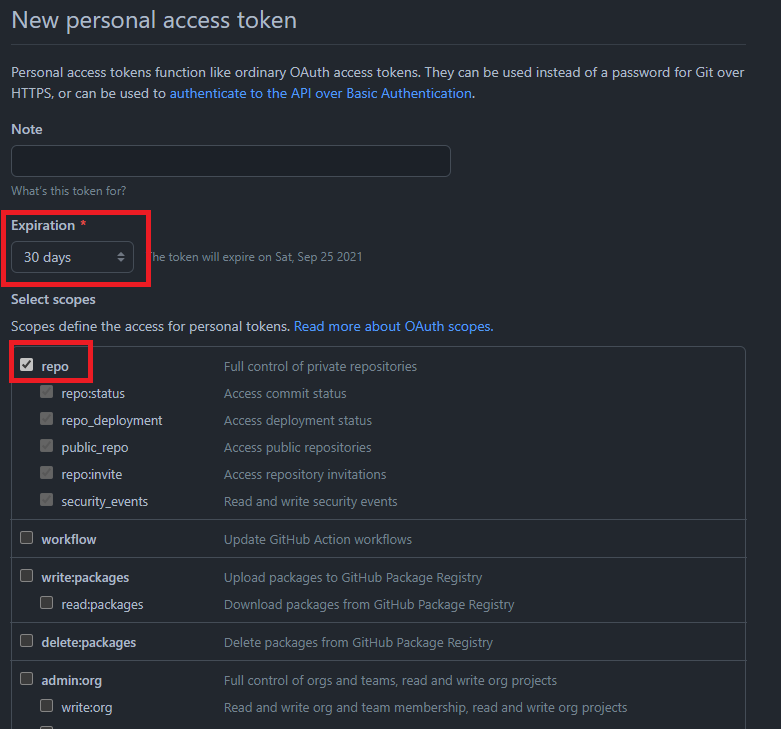
step 5. 設定 token 過期的時間、允許的範圍

【Git】問題解決:remote: Support for password authentication was removed on August 13, 2021. Please use a personal access token instead. remote: Please see https://github.blog/20XX-XX-XX-token-authentication-requirements-for-git-operations/ for more information.

step 6. 得到對應的 token

上面 step 5 後,我們會得到一串類似以下的 token

ghp_XXXXXXXXXXXXXXXXXXXXXXXXXXXXXX

之後我們回到我們的 terminal,
這次我們一樣輸入帳號,
並將「密碼改為上面那串 token」,問題即可解決。

Reference

使用 Hugo 建立
主題 StackJimmy 設計