前言
這篇是因為我在調整我自己網站時,
發現表格怎麼樣用都很醜,
後來認真的研究該怎麼辦的研究成果。
- 原來的樣子

有沒有看到表格都不見了!!!
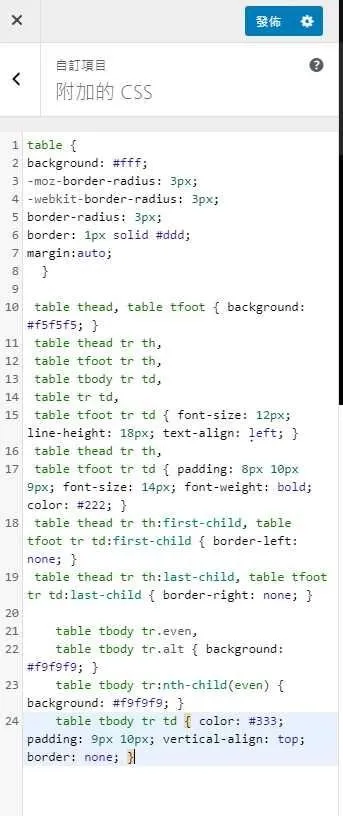
範例程式碼
引用自: https://www.techiestuffs.com/styling-tables-using-css-in-wordpress-theme/
table {
background: #fff;
-moz-border-radius: 3px;
-webkit-border-radius: 3px;
border-radius: 3px;
border: 1px solid #ddd;
margin:auto;
  }

 table thead, table tfoot { background: #f5f5f5; }
 table thead tr th,
 table tfoot tr th,
 table tbody tr td,
 table tr td,
 table tfoot tr td { font-size: 12px; line-height: 18px; text-align: left; }
 table thead tr th,
 table tfoot tr td { padding: 8px 10px 9px; font-size: 14px; font-weight: bold; color: #222; }
 table thead tr th:first-child, table tfoot tr td:first-child { border-left: none; }
 table thead tr th:last-child, table tfoot tr td:last-child { border-right: none; }

      table tbody tr.even,
      table tbody tr.alt { background: #f9f9f9; }
      table tbody tr:nth-child(even) { background: #f9f9f9; }
      table tbody tr td { color: #333; padding: 9px 10px; vertical-align: top; border: none; }
將上面這段程式碼加入在自己的外觀設定的 css 裡面
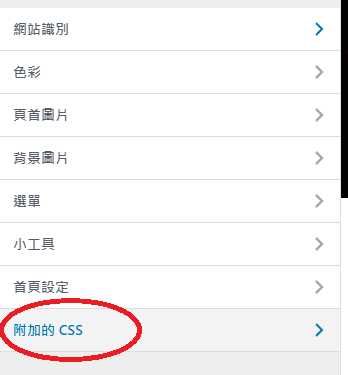
在外觀的這邊
直接貼上後發布
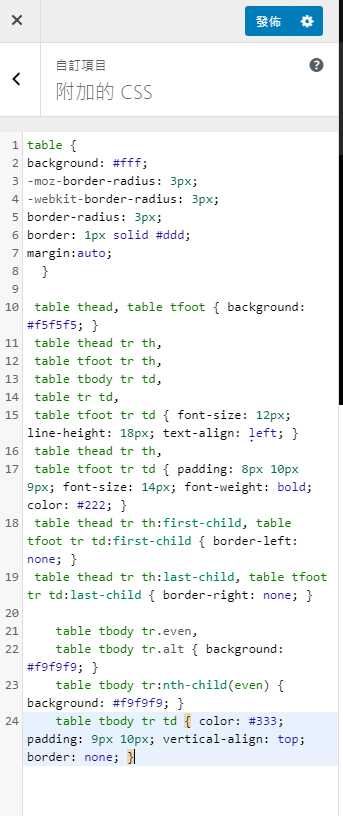
結果
- 直接給大家看吧XD (我有自己再稍微調整一下)
| 指令 | 功能簡述 | 補充說明 |
|---|---|---|
| cd | 切換資料夾 | 記法:change directory |
| ls | 查看資料夾內檔案(只有檔名) | |
| ll 或 ls -l | 查看資料夾內檔案(完整資訊) | |
| pwd | 查看目前路徑 |
想學習怎麼改,可以參考: https://www.w3schools.com/css/css_table.asp
至於這段內容在哪XD,在我的這篇文當中:
https://wongwongnotes.com/posts/linux-shell/basic-commands/linux/linux-ubuntu-terminal-basic/
Reference
https://www.techiestuffs.com/styling-tables-using-css-in-wordpress-theme/
https://www.w3schools.com/css/css_table.asp
https://www.w3schools.com/css/tryit.asp?filename=trycss_table_fancy